Contacts
Get in touch
Close

Contacts

Cape Town, South Africa

info@imoddigital.com

Glasgow, Scotland

hello@imoddigital.co.uk

Teaching Tuesday: Tracking clicks on your website

Most people who own a website are aware or have at least heard of goals and conversions. The goal or conversion being a specific action that takes place on a website which is tracked, such as making a purchase or completing a form. However, a lot of people aren’t aware that you can track clicks on a website and set those up as goals. For example, if you have an email address at the bottom of your website you might want to know how many people have clicked on said email address. Google Analytics has this functionality available and it’s our opinion that it’s heavily under utilised. Today we’re going to show you how to track clicks on your website with Google Analytics.
The first thing we need to do is create a goal almost as we usually do:

  1. Log into your Google Analytics account.
  2. Navigate to Goals under the “Admin” tab.
  3. Click on “+ New Goal”.
  4. From the Goal setup choose “Custom” and click “Continue”.
  5. Give the goal a name such as “Email click”.
  6. Choose “Event” for “Type” and click “Continue”.
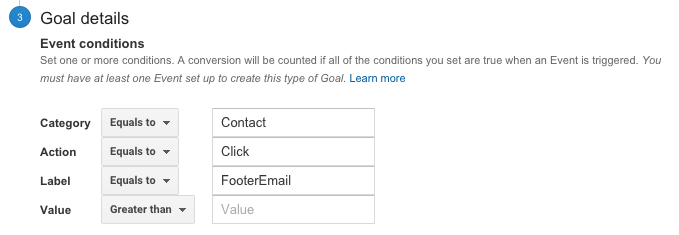
  7. Enter in a “Category”, “Action” and “Label” as per the screenshot example below. (further reading)
  8. Click the “Save” button.

Event Goal Settings
That’s the easy part, now Google Analytics knows that you want to track a click, but it doesn’t know which click exactly. This is where things get a bit more complicated and a basic level of programming is required or access to a web designer who can do the implementation for you. Once you’re at this point, you need to add some code to the link in your website’s HTML code that makes the email address at the bottom of your website clickable.
The code looks as follows:

It is the onclick code that triggers Google Analytics when someone clicks on the email address and when they do, the click will appear in Google Analytics where your goals/conversions usually do.
There are more advanced ways of collecting clicks and seeing them under the Events area of Google Analytics but for the sake of this tutorial we’re going to just stick to the simpler implementation. It’s really important that you track these clicks and not only enquiry form completions because a lot of people dislike filling out forms and would rather click on an email address and if we aren’t tracking the clicks we won’t know how many people have captured our email address and more importantly, we won’t be able to see which marketing channels are performing (or at least not accurately).
If you have any questions please pop us a comment in the comments section below!


Leave a Comment

Your email address will not be published. Required fields are marked *

  • slot gacor
  • desabet
  • desabet
  • slot gacor
  • slot gacor
  • desabet
  • toto togel
  • slot gacor
  • slot gacor
  • slot gacor
  • slot gacor
  • situs toto
  • desabet
  • desabet
  • rejekibetapk77.online -hoki
  • slot gacor
  • slot gacor
  • slot gacor
  • slot gacor
  • bandar togel
  • slot gacor
  • judi bola
  • slot gacor
  • toto slot
  • slot gacor
  • situs toto
  • slot gacor
  • slot gacor
  • slot88
  • slot gacor
  • slot 5k
  • slot depo 5k
  • slot gacor
  • toto slot
  • slot gacor
  • toto
  • toto togel
  • situs togel
  • slot gacor
  • slot gacor
  • situs togel
  • toto
  • slot gacor
  • slot gacor
  • desabet
  • situs hk pools
  • slot gacor
  • hongkong pools
  • depo 5k
  • toto
  • situs toto
  • situs toto
  • situs togel
  • situs togel
  • hk pools
  • situs toto
  • situs togel
  • bandar togel
  • slot gacor
  • bandar togel
  • desabet
  • toto togel
  • toto
  • slot gacor
  • slot gacor
  • slot gacor
  • toto slot
  • situs hk pools
  • slot gacor
  • slot gacor
  • togel 4d
  • situs toto
  • slot gacor
  • toto slot
  • toto slot
  • slot gacor
  • judi bola
  • toto
  • slot gacor
  • slot gacor
  • slot gacor
  • togel 4D
  • kudamania
  • rejekibet
  • situs togel
  • slot gacor
  • toto togel
  • Slot Gacor Hari Ini
  • toto togel
  • kudamania
  • slot gacor
  • toto togel
  • slot dana
  • situs toto
  • slot gacor
  • toto togel
  • situs togel
  • slot gacor
  • situs toto
  • slot resmi
  • slot gacor
  • slot gacor
  • slot gacor
  • situs togel
  • situs togel
  • slot gacor
  • slot gacor
  • slot gacor
  • slot gacor
  • slot hoki
  • slot hoki
  • slot gacor
  • situs togel
  • slot gacor
  • desamania
  • slot gacor
  • slot gacor
  • slot gacor
  • slot gacor
  • slot gacor
  • slot gacor
  • slot gacor
  • slot hoki
  • slot gacor
  • slot gacor
  • slot gacor
  • slot gacor
  • situs slot
  • slot gacor
  • slot gacor
  • slot gacor
  • slot gacor
  • slot hoki
  • situs toto
  • slot gacor
  • slot gacor
  • slot88
  • slot gacor
  • slot gacor
  • slot gacor
  • slot hoki
  • slot hoki
  • slot gacor
  • desamania
  • slot gacor
  • slot gacor
  • slot gacor
  • desabet
  • desabet
  • desabet
  • slot gacor
  • slot gacor
  • desamania
  • kudahoki
  • slot gacor
  • slot gacor
  • situs toto
  • slot gacor
  • desamania
  • slot gacor
  • slot gacor
  • desamania
  • slot gacor
  • slot gacor
  • slot gacor
  • slot gacor
  • slot gacor
  • togel
  • desabet
  • desabet
  • desabet
  • desabet
  • slot gacor
  • slot gacor
  • slot gacor
  • desabet
  • slot gacor
  • slot gacor
  • situs toto
  • slot gacor